
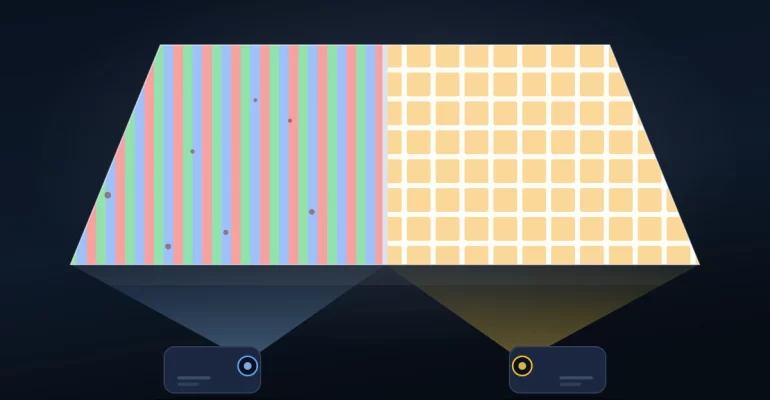
 hotack
DLP vs LCD projector: reflective DLP is better on compactness, precision and durability; transmissive LCD leads on low cost, strong color and no rainbow. Neither label settles the question. The light path decides the engine size you can build and how the projector behaves after year two. Both technologies are mature, and both ship in millions of units. The gap appears later, in service rates, in brightness after two years, and in unit cost once you move to volume.
This guide covers how each engine handles dust over years of use. It also looks at brightness past the first year, and at unit cost as order volume changes. Most buyers compare these engines on paper. Few compare them over three years. You will not find another spec table here. Those are everywhere already.
The comparison comes from the factory side. Hotack has built projectors since 2007, mostly single-LCD, with selected DLP projects. We wrote it for teams choosing a technology for a product line, a tender or a retail program. By the end you should know which engine fits your volume, your market and your service plan.
DLP vs LCD Projectors: Quick Comparison
DLP (Digital Light Processing) is reflective: light bounces off a digital micromirror device and into the lens. LCD (Liquid Crystal Display) is transmissive: light passes through liquid crystal panels, in a single-panel (1LCD) or three-panel (3LCD) build. Before the technical details, the table below summarizes the main differences between all three.
| Feature | DLP | 1LCD | 3LCD |
|---|---|---|---|
| Imaging Technology | Digital micromirror device (DMD) | Single LCD imaging panel | Three LCD imaging panels |
| Image Formation | Reflective micromirrors | Light passes through one LCD panel | Separate RGB panels combined optically |
| Common Applications | Pico, portable, home, and professional projection | Value-oriented portable and smart projectors | Education, business, home, and installation projection |
| Color Reproduction | Depends on color architecture and optical design | Full-color image from one panel | Simultaneous RGB imaging |
| Rainbow Effect | Possible with some single-chip systems | No single-chip DLP rainbow effect | No single-chip DLP rainbow effect |
| Maintenance | Depends on optical engine and cooling design | Depends on sealing and thermal management | Depends on optical engine and filter design |
| Cost Positioning | Ranges from compact models to premium systems | Common in cost-sensitive product segments | Broad range of commercial and home applications |
Quick answer: DLP is worth considering for compact optical designs and specialized projection applications. 1LCD can offer attractive value for portable smart projectors. Meanwhile, 3LCD is widely used where strong color light output and business projection performance matter.
These are general technology characteristics, not guaranteed results. Actual product performance depends on the complete projector design.
How Does DLP Projector Technology Work?
DLP stands for Digital Light Processing. Developed by Texas Instruments, this technology uses a Digital Micromirror Device (DMD) to control reflected light.
A DMD chip contains a large number of microscopic mirrors. Each mirror changes its position to direct light toward or away from the projection optics.
By controlling these mirrors rapidly, the projector creates the brightness patterns needed to form an image.
Single-Chip and Three-Chip DLP
Most consumer DLP projectors use a single DMD chip. These systems display different color components in rapid sequence.
Traditional lamp-based models commonly use a rotating color wheel. However, some LED and laser systems generate sequential colors without a conventional color wheel.
Three-chip DLP systems use separate DMD chips for red, green, and blue. They are primarily found in higher-end professional projection applications.
Advantages of DLP Projectors
- Compact optical designs: Single-chip DLP technology supports small projection engines used in selected portable and pico projectors.
- Precise digital imaging: Micromirror technology supports detailed image generation and fast optical modulation.
- Broad application range: DLP is used in consumer projectors, business systems, and large professional installations.
- Durable imaging architecture: DMD chips use inorganic micromirrors, although complete system durability depends on other components.
Limitations of DLP Projectors
- Rainbow effect: Some viewers notice brief flashes of color on certain single-chip DLP projectors.
- Color brightness differences: White brightness and color brightness can differ significantly between optical designs.
- Component cost: Some compact or specialized DLP configurations may carry higher component costs than alternative designs.
- Model-dependent performance: DLP technology alone does not guarantee better contrast, sharpness, or reliability.
As a result, business buyers should evaluate specific DLP products rather than assuming every DLP projector has the same characteristics.
How Does LCD Projector Technology Work?
LCD stands for Liquid Crystal Display. LCD projectors use liquid crystal imaging panels to control light passing through the optical system.
Unlike DLP, which reflects light from micromirrors, conventional LCD projection uses transmissive panels to form images.
However, LCD projectors are not all built the same way. The two important architectures are 1LCD and 3LCD.
What Is a 1LCD Projector?
A 1LCD projector uses a single liquid crystal panel to create a full-color image. The optical system illuminates the panel and projects the resulting image through a lens.
This architecture is commonly used in entry-level and midrange portable projectors, particularly models designed around value-oriented consumer and smart entertainment markets.
Using one imaging panel can simplify certain aspects of product construction. However, optical efficiency, brightness, and heat management remain important engineering challenges.
Modern 1LCD designs may include sealed optical engines, LED light sources, improved cooling, and automated image adjustment.
These features can improve usability and reduce certain maintenance concerns, depending on the specific product design.
What Is a 3LCD Projector?
A 3LCD projector uses three separate LCD imaging panels. Each panel controls one primary color: red, green, or blue.
The optical system separates the light into three color channels. After passing through the LCD panels, the images are recombined and projected onto the screen.
Because the three colors are displayed simultaneously, 3LCD systems avoid the color-sequential rainbow effect associated with some single-chip DLP projectors.
3LCD technology is widely used in education, office presentations, home entertainment, and professional projection systems.
Advantages and Limitations of LCD Projectors
LCD projectors offer different benefits depending on whether they use one or three imaging panels.
- 1LCD value: A single-panel design can support competitively priced portable and smart projector products.
- 3LCD color performance: Simultaneous RGB imaging supports strong color light output in suitable optical designs.
- No DLP-style rainbow effect: Conventional LCD image formation does not rely on sequential DMD color projection.
- Product flexibility: LCD technology supports different sizes, brightness levels, optical engines, and applications.
Nevertheless, LCD products also require appropriate thermal management, optical protection, and component quality.
Some designs may be sensitive to internal dust or long-term optical aging. The degree of sensitivity depends on the panels, materials, cooling system, and optical engine.
DLP vs LCD Image Quality: Which Looks Better?
Image quality is one of the main considerations when comparing DLP and LCD projectors.
However, the imaging technology is only one part of the picture. Native resolution, lens quality, brightness, contrast, image processing, and calibration all influence the final result.
Sharpness and Text Clarity
DLP projectors can deliver sharp images with well-defined pixel structures. Their single-chip architecture also avoids alignment differences between multiple imaging chips.
Modern LCD projectors can also produce clear text and detailed images. Therefore, DLP should not automatically be considered sharper than LCD.
For presentations, spreadsheets, and educational content, native resolution and optical quality often matter more than the technology label.
Buyer recommendation: Compare projectors using the same resolution, image size, and source material. Evaluate text clarity near the center and edges of the screen.
Color Accuracy and Color Brightness
Color performance depends on the projector’s optical architecture, light source, color management, and calibration.
3LCD systems display red, green, and blue simultaneously. This approach supports high color light output in many commercial projector designs.
Single-chip DLP projectors generate color sequentially. Depending on the color system, their measured white brightness may differ from their color brightness.
Meanwhile, 1LCD projectors have their own optical efficiency and color reproduction characteristics. Their performance should not be assumed to match 3LCD simply because both use LCD panels.
Buyer recommendation: Review measured brightness, color performance, and actual sample images. Avoid choosing a projector based only on advertised contrast or color claims.
Contrast Ratio and Black Levels
Contrast ratio describes the relationship between white and black levels. It affects perceived image depth, dark scenes, and shadow detail.
Some DLP designs provide strong contrast performance. However, LCD systems can also achieve good results through improved panels, optics, and image processing.
Native contrast, dynamic contrast, and ANSI contrast use different measurement methods. Consequently, their advertised values should not be compared without understanding the testing conditions.
For business applications, sufficient brightness and readable content may matter more than extremely high advertised dynamic contrast ratios.
Rainbow Effect and Viewing Comfort
The rainbow effect refers to brief flashes of separated colors that some people perceive with color-sequential projection systems.
It is most commonly discussed in relation to single-chip DLP projectors. The effect varies with projector design, image content, and viewer sensitivity.
Conventional 1LCD and 3LCD systems do not produce this particular DLP color-sequential artifact.
Buyer recommendation: If viewer sensitivity is a concern, test the actual projector with high-contrast content before making a bulk purchasing decision.
Dust Sealing: The Failure Mode a One-Week Test Misses
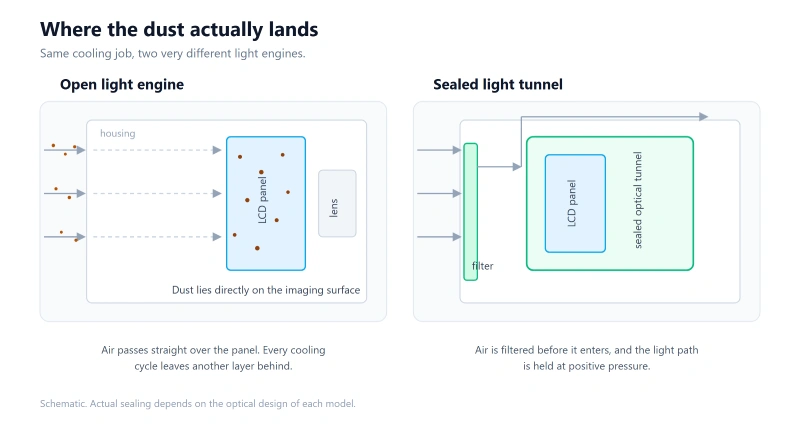
Every projector pulls air through its case to stay cool. That air carries dust. A review run in a clean room never sees what happens next, but a classroom, a workshop or a coastal warehouse will.
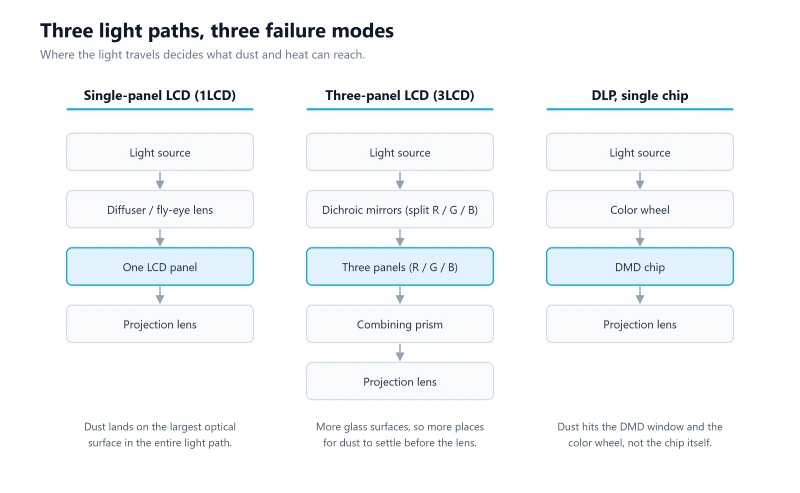
Where the dust lands depends on the engine. In a single-panel LCD projector, the panel is the largest optical surface in the light path. A thin film of dust on it blocks pixels directly. The result shows up as soft grey spots that grow with every month of use.
A three-panel LCD engine adds dichroic mirrors and a combining prism. That means more glass surfaces, and more places for dust to settle before the image reaches the lens.
A DLP engine keeps the DMD sealed inside its package. Dust reaches the window in front of it, the color wheel and the relay optics instead. The DMD itself rarely fails. The image still hazes over, and the color wheel gets noisy long before it stops.
Three things decide how well an engine survives this. The optical tunnel needs a seal, not just a filter. The airflow path should hold positive pressure inside the light engine. And the filter has to be serviceable without opening the optics.
Hotack designs dust-proof structures into its LCD engines and holds patents covering them. When we quote a project, sealing is one of the first things we ask about, because it decides the return rate two years out.
Brightness Decay and Lifespan: What Changes After Year One
Projector lifespan is more complicated than comparing DLP micromirrors with LCD panels.
The imaging device, light source, cooling system, electronics, and operating environment all contribute to long-term reliability.
DLP Imaging Chip Durability
DLP projectors use DMD chips containing inorganic micromirrors. This architecture has established applications in products requiring long operating periods.
However, a durable imaging chip does not guarantee that the complete projector will operate indefinitely.
Light sources, cooling fans, electronic components, and optical materials may still require maintenance or replacement.
LCD Panel Aging and Thermal Management
LCD imaging systems use liquid crystal materials and optical components that can be affected by heat and prolonged operation.
Effective cooling, suitable optical materials, and controlled operating temperatures are important for maintaining consistent performance.
Modern LCD projectors may incorporate improved thermal systems and protected optical engines to reduce operating risks.
Therefore, it is inaccurate to assume that every LCD projector will have a shorter useful life than every DLP projector.
Light Source Lifespan Is a Separate Specification
LED, laser, and traditional projection lamps are light source technologies. They are not the same as DLP or LCD imaging technologies.
Both DLP and LCD projectors can use different light source designs.
For example, laser illumination is used in both DLP and 3LCD systems. Likewise, LED light sources are common in compact portable projector products.
Rated light source life should be evaluated using the manufacturer’s stated operating conditions and testing criteria.
Buyer recommendation: Compare complete projector reliability, light source ratings, warranty terms, and testing results instead of assuming one imaging technology always lasts longer.
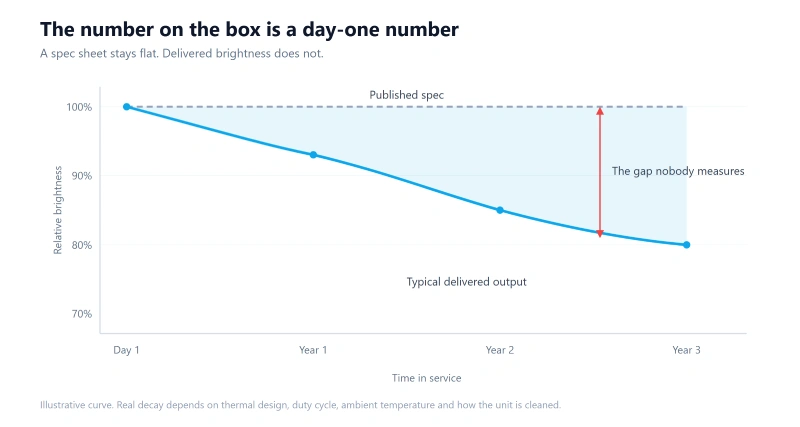
Published brightness is a day-one figure. It says nothing about year two. Two projectors that both claim the same ANSI lumens can sit at very different points after 8,000 hours, and the gap comes from thermal design more than from the light source itself.
LED and laser sources dim along a slow curve. Lamp sources drop faster in the first few hundred hours, then flatten. Both behaviors are known and easy to plan around.
Panel degradation is the part buyers underestimate. An LCD panel loses contrast as its polarizers age, and heat accelerates the change. The image does not go dark. It goes flat, and color drifts before brightness does.
A DMD does not degrade the same way. It is a mechanical device, and its failure mode is a stuck mirror rather than gradual dimming. What decays in a DLP projector is the light path around it: the wheel, the relay optics and the coatings.
When you specify a projector, ask for the brightness figure at 10,000 hours, not at zero. Ask for the thermal margin at 40 degrees ambient. If a supplier cannot answer either question, the day-one number is the only number you will ever get.
Maintenance, Uptime and Cost at Volume
What Total Cost of Ownership Includes
For commercial installations and wholesale sourcing, purchase price is only one part of the total cost of ownership.
Maintenance, power consumption, cleaning requirements, component replacement, and service support also affect long-term costs.
| Cost Factor | What Buyers Should Check |
|---|---|
| Initial Purchase Price | Model configuration, imaging technology, and included features |
| Power Consumption | Rated power and expected daily operating hours |
| Light Source Life | Rated life, operating conditions, and service options |
| Optical Engine Protection | Sealing, dust control, and recommended cleaning procedures |
| Cooling System | Ventilation, operating temperature, and maintenance needs |
| Warranty and Repairs | Coverage terms, replacement parts, and technical support |
| Production Consistency | Quality control and consistency across purchase batches |
Maintenance Depends on the Engine, Not the Label
A DLP projector does not automatically have a completely sealed optical system. Similarly, not every LCD projector requires frequent filter cleaning.
Maintenance requirements depend on the manufacturer’s actual optical and mechanical design.
For instance, a well-designed sealed 1LCD optical engine may reduce dust-related maintenance compared with an unprotected design.
Buyer recommendation: Request model-specific maintenance instructions and warranty information. Compare service requirements across actual products rather than technology categories alone.
How Unit Cost Changes With Order Volume
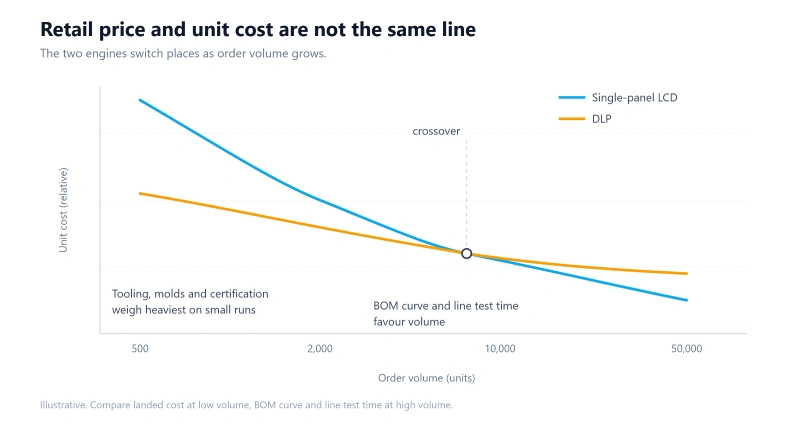
Retail price tells you what a buyer pays. It does not tell you what a unit costs you. Those two numbers move apart quickly once order size changes, and they move at different speeds for the two engines.
A single-panel LCD engine is a short light path. One panel, one lens group, one driver board, fewer alignment steps on the line. That is why it scales down well at high volume.
A DLP engine carries a DMD, a controller and either a color wheel or an RGB light engine. The DMD comes from a single supplier, so allocation and lead time follow that supplier’s cycle, not yours.
Tooling behaves differently too. Injection molds, test fixtures and certification are fixed costs. They spread across units, so a 5,000-unit run and a 50,000-unit run do not share the same unit cost even when the bill of materials does not change.
The practical rule: at low volume, compare landed cost including tooling and certification. At high volume, compare the BOM curve and the test time per unit. The engine that wins at 2,000 units is not always the one that wins at 50,000.
DLP vs LCD: Which Is Best for Different Applications?
There is no universal winner between DLP and LCD. Different technologies may be suitable depending on the intended application and product requirements.
| Application | Technology to Evaluate | Reason |
|---|---|---|
| Compact Pico Projection | DLP or compact 1LCD | Small product size, optical design, and portability |
| Affordable Smart Home Projectors | 1LCD | Value-oriented product design and smart features |
| Classroom and Meeting Rooms | 3LCD, DLP, or suitable 1LCD | Brightness, screen size, and viewing conditions |
| Professional Large-Venue Projection | High-brightness 3LCD or DLP | Specialized optical systems and higher light output |
| Portable Entertainment | 1LCD or DLP | Weight, connectivity, power needs, and image quality |
| Custom OEM/ODM Projects | 1LCD or DLP, depending on feasibility | Target cost, specifications, platform availability, and development scope |
When Should You Choose DLP?
DLP is worth evaluating when compact optical design, specialized projection requirements, or particular imaging characteristics are important.
For example, selected pico projectors and professional projection systems use DLP architectures to address different technical requirements.
However, the suitability of any DLP model still depends on its brightness, resolution, optics, and total system design.
When Should You Choose 1LCD?
1LCD is worth considering for value-oriented smart projectors, portable entertainment products, and cost-sensitive distribution markets.
Its single-panel architecture supports different product designs, while modern optical engines can include sealed structures and improved cooling.
For brands targeting home entertainment and portable projection, 1LCD may offer a practical balance of functionality, product cost, and customization opportunities.
When Should You Choose 3LCD?
3LCD is worth evaluating for business, education, and installation applications where strong color light output is important.
Its three-panel design produces simultaneous RGB images without the color-sequential rainbow effect associated with some single-chip DLP systems.
Nevertheless, the selected model must still meet the required brightness, installation, maintenance, and budget specifications.
How Hotack Supports LCD and DLP Projector Projects
Hotack is a projector OEM and ODM manufacturer founded in 2007, with R&D and manufacturing operations in Chengdu and Shenzhen, China.
Our primary manufacturing focus is single-LCD projector technology. Hotack also supports selected DLP projector OEM and ODM projects based on customer requirements and technical feasibility.
Rather than recommending one imaging technology for every customer, we evaluate product requirements and suitable development platforms.
LCD Projector Development and Manufacturing
Hotack develops and manufactures LCD projectors for global brands, distributors, and other business customers.
Our product range includes portable projectors, smart home projectors, and models designed for different entertainment and commercial applications.
Depending on the selected platform, customization may involve hardware, software, product appearance, user interfaces, branding, and packaging.
DLP Projector OEM and ODM Support
For selected customer projects, Hotack can evaluate DLP-based solutions according to technical specifications, product requirements, and platform feasibility.
Project scope may vary according to the optical engine, available hardware, software requirements, and intended application.
Accordingly, customers should discuss their desired imaging technology before confirming product development and manufacturing arrangements.
Choosing the Right Technology for OEM/ODM Sourcing
For projector brands and procurement teams, technology selection should begin with the intended product positioning.
Before requesting an OEM or ODM quotation, clarify the following requirements:
- Application: Home entertainment, education, portable projection, or specialized commercial use.
- Image specifications: Target brightness, native resolution, throw ratio, and screen size.
- Product design: Dimensions, weight, structure, cooling, and optical requirements.
- Software: Operating system, smart features, user interface, and regional compatibility.
- Target cost: Product positioning, expected selling price, and budget constraints.
- Market compliance: Applicable testing, documentation, and regulatory requirements.
- Order requirements: Estimated quantity, sample needs, and expected production schedule.
With these details, Hotack can assess suitable product platforms and discuss available customization options.
Explore our projector OEM and ODM solutions to learn more about engineering, customization, testing, and mass production.
You can also browse our LCD and DLP projector product range to compare available models.
Frequently Asked Questions About DLP vs LCD Projectors
Is DLP better than LCD for projectors?
Not universally. DLP and LCD offer different imaging architectures and product design options. The better choice depends on brightness, image quality, application, budget, and model-specific performance.
What is the difference between 1LCD and 3LCD projectors?
1LCD uses one imaging panel to create a full-color picture. In contrast, 3LCD uses three separate panels for red, green, and blue, combining the color images optically.
Do DLP projectors last longer than LCD projectors?
Not necessarily. DLP micromirror chips have different aging characteristics from LCD panels. However, overall projector lifespan also depends on the light source, cooling system, electronics, and maintenance conditions.
Which projector technology has better image quality?
Both DLP and LCD can produce high-quality images. Native resolution, optical design, color performance, contrast, and calibration are more useful for comparing individual projectors.
Do all DLP projectors have the rainbow effect?
No. Some single-chip DLP systems can produce visible color breakup for sensitive viewers. The effect varies by design, while three-chip DLP systems display color differently.
Can LCD projectors use laser light sources?
Yes. Laser illumination is used in both LCD and DLP projection systems. The light source and imaging technology are separate aspects of projector design.
Which technology is better for projector OEM and ODM projects?
The choice depends on target specifications, development cost, application, and platform availability. Hotack focuses on 1LCD manufacturing and supports selected DLP projects when technically feasible.
Do DLP or LCD projectors need better dust protection?
Neither technology is dust-proof by default. What matters is the optical engine design. An unprotected light path lets dust settle on the imaging panel or the DMD window, which shows up as dark spots and gradual brightness loss. Sealed light paths, positive-pressure cooling and scheduled filter service keep a projector running for years, regardless of whether the engine is DLP or LCD.
Why does projector brightness drop after the first year?
The brightness number on the box is a day-one measurement, not a lifetime rating. LCD panels and polarizers yellow under sustained heat, optical surfaces collect dust, and light sources lose output as operating hours accumulate. Thermal design and duty cycle decide how fast this happens, so compare rated operating hours and cooling design instead of initial lumens only.
Choose the Right Projector Technology With Hotack
The DLP vs LCD projector decision should be based on actual product requirements rather than technology reputation alone.
DLP, 1LCD, and 3LCD each have suitable applications. Comparing specific models helps buyers understand differences in image performance, maintenance, cost, and long-term usability.
Hotack develops LCD projectors and provides selected DLP project support for brands, distributors, wholesalers, and OEM/ODM customers.
Share your intended application, technical specifications, target market, and estimated order quantity with our team.
