
What Is an LCD Projector? Benefits and Limitations
 hotack
LCD projector uses liquid crystal display technology to turn digital images and video into a projected picture, delivering accurate color and clear text. Unlike DLP systems that reflect light off a chip, LCD projection passes light through panels, which is the main reason for its color advantages.
Beyond accurate color, LCD projectors deliver clear text, avoid the rainbow effect entirely, and span configurations from portable LCD projectors to classroom and business installations. Contrast and maintenance are the main considerations when comparing models, and most LCD designs use either a single panel (1LCD) or three panels (3LCD), which affects color brightness and cost.
This guide explains how LCD projection works, what makes it strong, and how to choose the right LCD projector for your room and application.
An LCD projector uses liquid crystal display technology to turn digital images and video into a projected picture. It directs light through a liquid crystal imaging system and projection lens to display content on a wall or screen.
Today, LCD projectors serve a wide range of applications, including home entertainment, classrooms, business presentations, and portable projection. However, choosing the right model requires more than understanding its display technology. Brightness, native resolution, light source, and optical design also affect the final viewing experience.
How Does an LCD Projector Work?
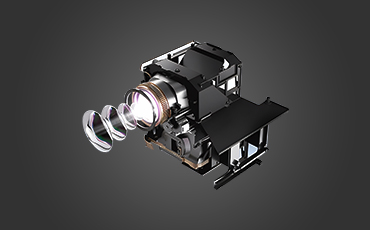
An LCD projector creates images by controlling how light passes through liquid crystal panels. First, a light source illuminates the imaging system. The panels then regulate the light according to the incoming image signal, while the projection lens directs the resulting picture onto the screen.
Although the basic principle is similar, LCD projectors do not all use the same optical architecture. Some models use a single LCD panel, whereas 3LCD systems use three separate panels to process red, green, and blue light.
Single-LCD Projection
A single-LCD projector uses one liquid crystal panel to form the projected image. This design is common in compact, cost-conscious products, including many portable projectors.
During operation, light passes through the LCD panel, which controls different areas of the image. The projection lens then focuses that image onto the screen. Consequently, panel resolution, optical quality, light output, and cooling design all influence the final result.
3LCD Projection Technology
Unlike a single-LCD design, a 3LCD projector uses three separate liquid crystal panels. Its optical system divides light into red, green, and blue components, processes each color through a dedicated panel, and combines the images before projection.
This architecture can deliver strong color brightness and natural color reproduction. In addition, because the three primary colors are processed simultaneously, 3LCD systems avoid the specific rainbow effect associated with some single-chip DLP projectors that use sequential color processing.
It is important to distinguish these architectures when comparing products. Both use LCD technology, but their optical systems and performance characteristics are not identical.
What Light Sources Do LCD Projectors Use?
LCD describes the imaging technology rather than the light source. Depending on the product design, an LCD projector may use a traditional lamp, LEDs, or a laser-based illumination system.
- Lamp-based projectors: These models use a projection lamp, which may require replacement after its rated operating life.
- LED projectors: Light-emitting diodes provide illumination and are commonly used in compact projection products.
- Laser projectors: Laser-based illumination can support different brightness and operating-life requirements, depending on the system design.
Because these light sources serve different needs, buyers should compare operating life, brightness, maintenance, and power requirements. Moreover, lamp, LED, and laser illumination can be used with different projection technologies, so the light source alone does not identify the imaging system.
Advantages of LCD Projectors
1. Strong Color Performance
LCD projection can produce clear, colorful images when the panel and optical system are properly designed. In particular, 3LCD systems process red, green, and blue light simultaneously, which can provide strong color brightness.
Nevertheless, color performance varies by model. Calibration, light output, panel quality, and image processing all influence the result, so buyers should compare actual specifications rather than relying on the LCD label alone.
2. Clear Text and Detailed Images
LCD projectors can display detailed text, diagrams, photographs, and video when their native resolution and optical quality meet the application requirements. For example, business presentations often benefit from sharp text and clearly defined graphics.
However, image sharpness depends on more than display technology. Native resolution, lens quality, focus uniformity, and projection-surface conditions also affect how clearly the image appears.
3. No Color-Wheel Rainbow Effect
Some single-chip DLP projectors use a color wheel to display colors sequentially. As a result, certain viewers may notice brief rainbow-like artifacts in high-contrast scenes.
LCD projection does not rely on that same color-wheel method. Therefore, it avoids this specific type of color breakup, although overall image quality still depends on the complete projector design.
4. Options for Different Applications
LCD projectors are available in different sizes and configurations, ranging from compact portable models to products designed for education and business. This variety gives buyers more options when balancing performance, installation requirements, and budget.
Even so, LCD technology does not automatically guarantee lower power consumption, higher brightness, or a lower purchase price than competing technologies. Those advantages depend on the individual model and its specifications.
Limitations of LCD Projectors
1. Panel and Optical System Considerations
Image quality depends on the condition and performance of the liquid crystal panel and optical components. Over time, heat, dust, and component wear may affect performance, depending on the projector’s construction and operating conditions.
For 3LCD systems, accurate alignment of the three color panels is also important. Otherwise, misalignment can reduce image sharpness and create color-registration problems.
2. Contrast and Black-Level Performance
Contrast describes the difference between the brightest white and darkest black a projector can reproduce. Optical design, light leakage, and image processing all influence this performance.
However, contrast varies considerably among LCD projectors. For this reason, buyers should compare published specifications and independent measurements where available instead of assuming that every LCD model has the same black-level performance.
3. Maintenance and Dust Management
Some LCD projector designs require regular attention to filters, ventilation, and optical cleanliness. Dust entering the optical system can affect the projected image, while inadequate cooling may reduce component reliability.
Maintenance requirements vary by model. Before purchasing, review the manufacturer’s cleaning instructions, cooling design, and recommended maintenance schedule. This helps you understand the ongoing costs as well as the initial purchase price.
4. Size and Portability Depend on the Design
LCD projectors are not necessarily bulky or heavy. Some models are compact enough for portable use, while others are designed for fixed installations or higher-output applications.
Therefore, anyone choosing a portable projector should compare its actual dimensions, weight, power requirements, cooling system, and available connections. Imaging technology alone does not determine portability.
LCD vs. DLP Projectors: What Is the Difference?
LCD and DLP are two major digital projection technologies. LCD systems use liquid crystal panels to control light, whereas DLP systems use a digital micromirror device to control reflected light.
Although both technologies can produce high-quality images, they differ in their imaging architecture and color-generation methods. The following table summarizes the main points buyers should consider.
| Feature | LCD Projector | DLP Projector |
|---|---|---|
| Imaging technology | Liquid crystal panel or panels | Digital micromirror device |
| Color generation | Depends on the LCD architecture; 3LCD processes RGB simultaneously | Depends on the design; many single-chip models use sequential color processing |
| Rainbow effect | Avoids the specific color-wheel rainbow effect | Some single-chip designs may produce visible rainbow artifacts |
| Image sharpness | Depends on resolution, panel quality, alignment, and optics | Depends on resolution, micromirror design, processing, and optics |
| Contrast | Varies by panel and optical design | Varies by imaging system and optical design |
| Maintenance | Depends on cooling, filters, and optical construction | Depends on cooling, dust protection, and optical construction |
| Applications | Home entertainment, portable projection, education, and business | Home entertainment, portable projection, education, and business |
Ultimately, neither technology is the best choice for every situation. Instead, compare brightness, native resolution, contrast, color performance, product size, and maintenance requirements to identify the right projector for your application.
For a real product example, the Hotack D068 1080p Triple-Laser Ultra-Short-Throw DLP Projector uses DLP technology. Its specifications illustrate how a specific product combines an imaging system with other optical and light-source features.
How to Choose an LCD Projector
Choosing the right LCD projector starts with the intended application and the installation environment. Before comparing individual models, consider the following factors.
1. Native Resolution
Native resolution determines the number of pixels the projector can display. Common options include 720p and Full HD 1080p, while higher-resolution models may suit more demanding applications.
It is also important to distinguish native resolution from video-decoding support. A projector that accepts or decodes a 4K source does not necessarily have native 4K resolution.
2. Brightness
Brightness affects image visibility under different lighting conditions. Consider the room’s ambient light, intended screen size, and viewing environment before choosing a brightness level.
For a more reliable comparison, check brightness ratings measured using the same standard, such as ANSI lumens. Unspecified marketing-lumen figures should not be treated as directly equivalent to standardized measurements.
3. Light Source and Operating Life
Compare lamp, LED, and laser options according to rated operating life, replacement requirements, power consumption, and overall product cost. Meanwhile, remember that actual service life depends on the specific design and operating conditions.
4. Throw Ratio and Installation Distance
Throw ratio determines how far a projector needs to be from the screen to produce a particular image size. Measure the available room depth first, then compare it with the manufacturer’s projection-distance specifications.
If installation space is limited, a short throw model may be a better fit. Read our guide to short throw projectors to learn how throw ratio affects projector placement.
5. Connectivity and Smart Features
Check whether the projector offers the HDMI, USB, audio, Wi-Fi, or Bluetooth connections required for your setup. In addition, smart projector models may include an operating system and support selected streaming applications.
However, available apps and connectivity features depend on the specific model and software configuration. Confirm compatibility before purchasing if a particular service or connection is essential.
6. Cooling, Maintenance, and Reliability
Review the projector’s ventilation, cooling design, maintenance instructions, and warranty coverage. These factors are particularly important for products expected to operate for extended periods in classrooms, offices, or other business environments.
Where Are LCD Projectors Used?
Home Entertainment
LCD projectors can support movie viewing, streaming, gaming, and other home entertainment applications. To choose a suitable model, compare native resolution, brightness, contrast, connectivity, and installation requirements.
Education
In classrooms and training rooms, LCD projectors can display text, diagrams, educational videos, and presentations. For these applications, brightness, resolution, connectivity, and compatibility with existing classroom equipment are important considerations.
Business Presentations
LCD projectors can also serve meeting rooms, offices, and training environments where clear text and presentation graphics are essential. The appropriate model depends on room lighting, audience size, screen dimensions, and available installation space.
Frequently Asked Questions About LCD Projectors
What does LCD stand for in a projector?
LCD stands for liquid crystal display. In an LCD projector, liquid crystal panels control light to form the image displayed on the screen.
What is the difference between single-LCD and 3LCD projectors?
A single-LCD projector uses one liquid crystal panel to form an image, while a 3LCD projector uses three panels to process red, green, and blue light separately. As a result, their optical architectures and performance characteristics differ.
Are LCD projectors better than DLP projectors?
Neither technology is universally better. LCD and DLP projectors differ in their imaging systems, color-generation methods, and optical designs. Therefore, compare the specifications and actual performance of the models you are considering.
Can an LCD projector use an LED or laser light source?
Yes. An LCD projector can use a traditional lamp, LEDs, or a laser-based illumination system, depending on its design. LCD describes the imaging technology rather than the illumination method.
Are LCD projectors suitable for business use?
LCD projectors can support business presentations, training, and other workplace applications. However, buyers should select a model according to brightness, native resolution, connectivity, installation requirements, and expected operating conditions.
What should I check before buying an LCD projector?
Compare native resolution, standardized brightness ratings, light-source life, throw ratio, connectivity, maintenance requirements, and warranty coverage. Together, these factors help determine whether a particular model meets your needs.
Explore Hotack Projector Solutions
LCD projection technology offers options for home entertainment, portable projection, education, and business use. The right choice depends on the imaging architecture, native resolution, brightness, light source, and overall product configuration.
Hotack develops LCD projectors for different applications, with selected DLP models also available. For B2B buyers, reviewing the specifications of each model is an important step toward identifying suitable products for a target market.
Explore the Hotack projector range or learn more about projector OEM and ODM services for product sourcing and customization.
